
Shortcuts
Create and control timers with Apple Shortcuts
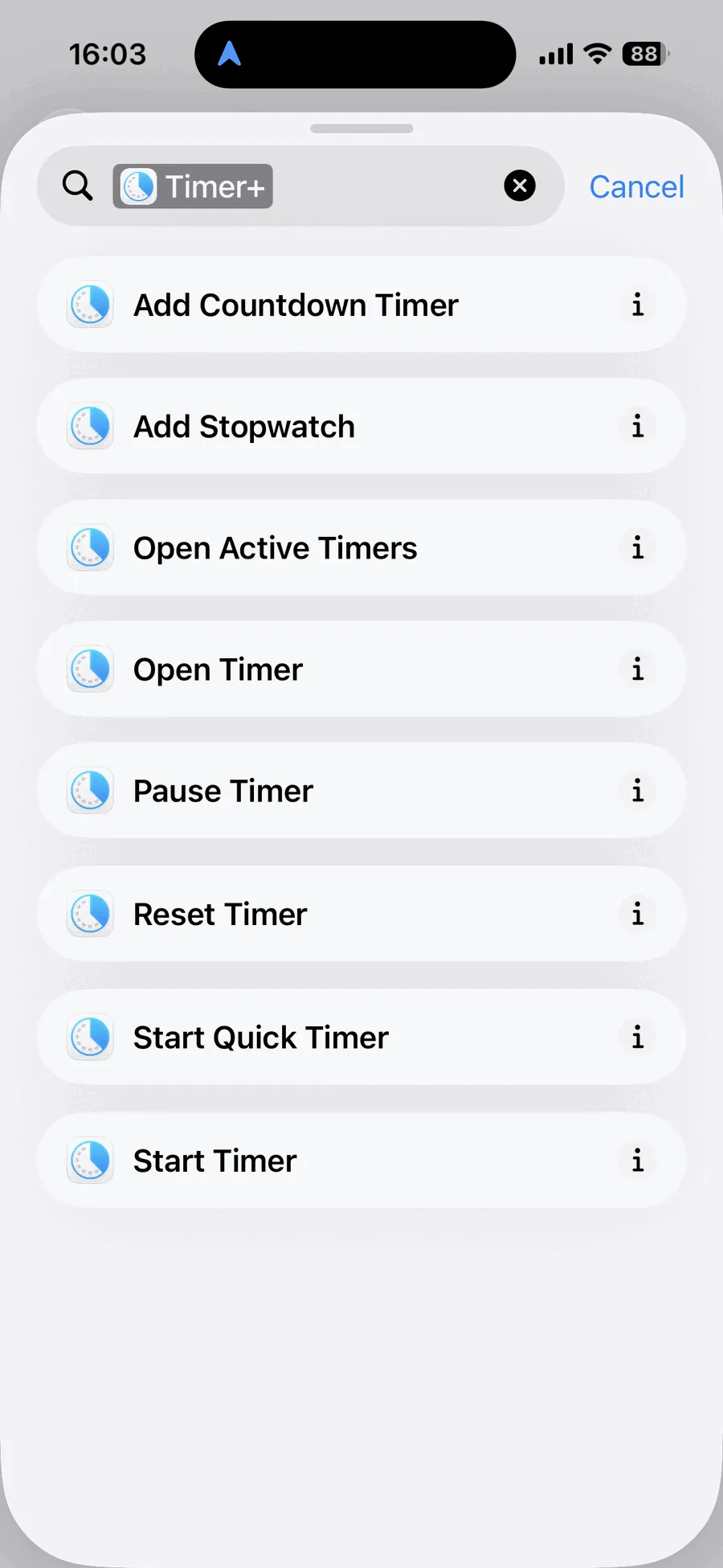
Timer+ provides eight actions for Apple Shortcuts on iPhone and iPad. Use them to create timer presets, start and control timers, open a timer in Timer+, or build Personal Automations.
Timer+ Shortcuts action catalog
Section titled “Timer+ Shortcuts action catalog”These are the exact action names shown in the Shortcuts app.
| Action | Parameters | What it does | Opens Timer+ |
|---|---|---|---|
| Add Countdown Timer | Duration; optional Name and Sound | Creates a saved countdown timer preset | No |
| Add Stopwatch | Optional Name | Creates a saved stopwatch preset | No |
| Open Active Timers | None | Opens the Active Timers list | Yes |
| Open Timer | Timer | Opens one selected saved timer | Yes |
| Pause Timer | Timer | Pauses one selected timer | No |
| Cancel | Timer | Resets one selected timer | No |
| Start Quick Timer | Duration; optional Name | Creates and starts a temporary countdown timer | No |
| Start Timer | Timer | Starts one selected saved timer | No |
Create timer presets
Section titled “Create timer presets”Add Countdown Timer
Section titled “Add Countdown Timer”Creates a saved countdown timer without starting it. Duration is required. You can optionally give the timer a name and choose the sound that plays when it finishes.
Add Stopwatch
Section titled “Add Stopwatch”Creates a saved stopwatch without starting it. Its name is optional.
Start and control timers
Section titled “Start and control timers”Start Timer
Section titled “Start Timer”Starts a saved Timer+ timer selected in the action. Timer+ does not need to open when the Shortcut runs.
Pause Timer
Section titled “Pause Timer”Pauses a selected Timer+ timer without opening the app.
Cancel
Section titled “Cancel”Resets a selected Timer+ timer without opening the app.
Start Quick Timer
Section titled “Start Quick Timer”Creates and immediately starts a countdown timer for the duration you provide. You can optionally name it. The quick timer uses your default sound and is deleted after it finishes.
Use Start Quick Timer when you need a one-off timer. Use Start Timer when you want to run a timer you already saved in Timer+.
Open Timer+
Section titled “Open Timer+”Open Timer
Section titled “Open Timer”Opens Timer+ directly to a selected saved timer.
Open Active Timers
Section titled “Open Active Timers”Opens Timer+ to the list of timers that are currently running or paused.
Use Timer+ actions in Shortcuts
Section titled “Use Timer+ actions in Shortcuts”In the Shortcuts app, add an action and search for Timer+ to see the available actions. After you build a Shortcut, you can run it from the Shortcuts app, add it to a Personal Automation, or ask Siri to run it by name.
For a practical example, see Start a Timer at a Scheduled Time.
Availability
Section titled “Availability”All Timer+ Shortcuts actions and all saved timer choices are available without Timer+ Pro.
For one-tap access from your Home Screen, compare the Timer+ widgets for iPhone and iPad.
Shortcuts and Live Activities
Section titled “Shortcuts and Live Activities”Timers started through Shortcuts do not begin a Live Activity on the Lock Screen or in the Dynamic Island because iOS requires Timer+ to be open and visible when a third-party app starts one. The timer still runs and Timer+ can notify you when it finishes.