
คำสั่งลัด
สร้างและควบคุมตัวจับเวลาด้วยคำสั่งลัดของ Apple
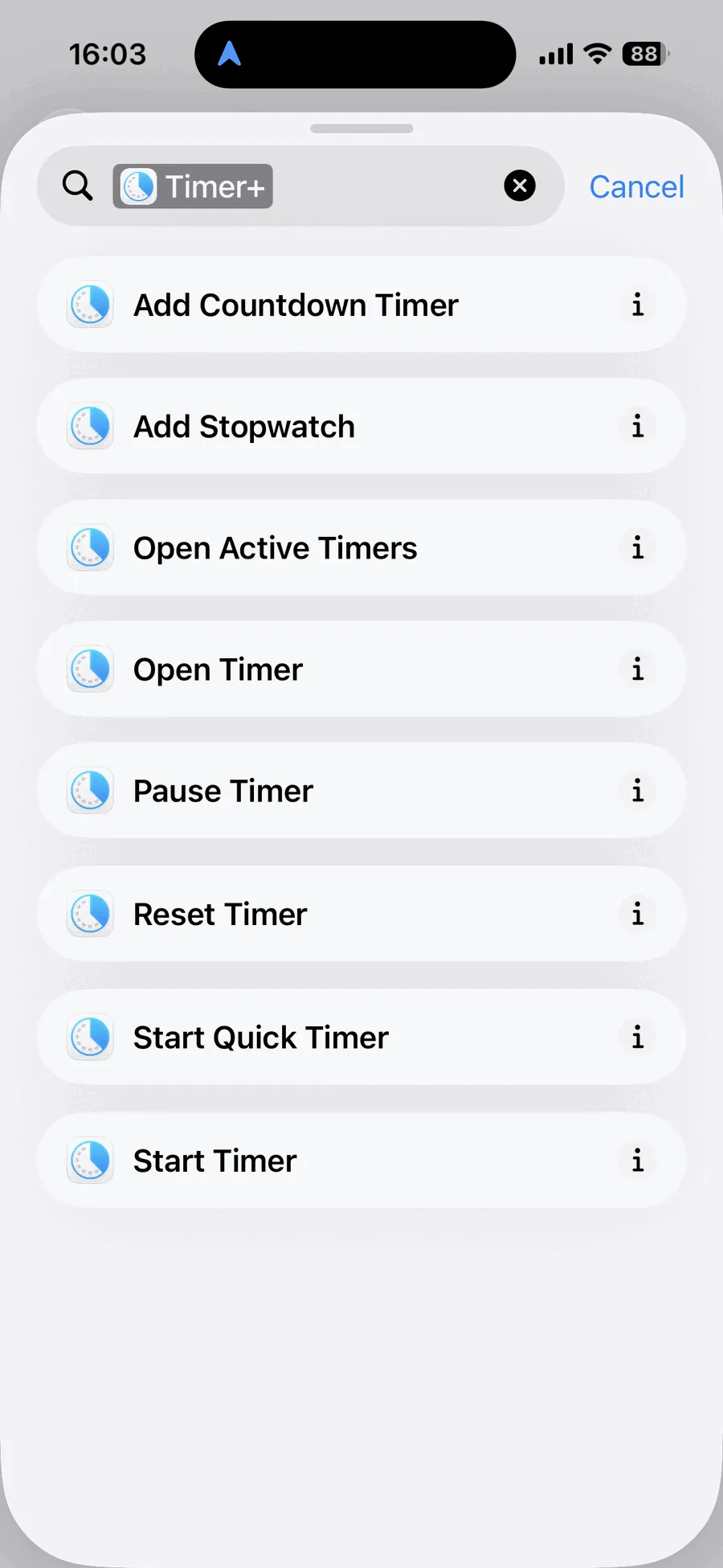
Timer+ มีการทำงาน 8 รายการสำหรับคำสั่งลัดของ Apple บน iPhone และ iPad ใช้เพื่อสร้างค่าตั้งต้นของตัวจับเวลา เริ่มและควบคุมตัวจับเวลา เปิดตัวจับเวลาใน Timer+ หรือสร้างการทำงานอัตโนมัติส่วนตัว
รายการการทำงานของ Timer+ ในคำสั่งลัด
หัวข้อที่มีชื่อว่า “รายการการทำงานของ Timer+ ในคำสั่งลัด”ชื่อการทำงานต่อไปนี้ตรงกับที่แสดงในแอปคำสั่งลัดทุกประการ
| การทำงาน | พารามิเตอร์ | สิ่งที่ทำ | เปิด Timer+ |
|---|---|---|---|
| เพิ่มตัวจับเวลาถอยหลัง | ระยะเวลา; ชื่อและเสียง (ไม่บังคับ) | สร้างค่าตั้งต้นของตัวจับเวลาที่บันทึกไว้ | ไม่ |
| เพิ่มนาฬิกาจับเวลา | ชื่อ (ไม่บังคับ) | สร้างค่าตั้งต้นของนาฬิกาจับเวลาที่บันทึกไว้ | ไม่ |
| เปิดตัวจับเวลาที่ใช้งานอยู่ | ไม่มี | เปิดรายการตัวจับเวลาที่ใช้งานอยู่ | ใช่ |
| เปิดตัวจับเวลา | ตัวจับเวลา | เปิดตัวจับเวลาที่บันทึกไว้หนึ่งตัวที่เลือก | ใช่ |
| หยุดตัวจับเวลาชั่วคราว | ตัวจับเวลา | หยุดตัวจับเวลาที่เลือกหนึ่งตัวชั่วคราว | ไม่ |
| ยกเลิก | ตัวจับเวลา | รีเซ็ตตัวจับเวลาที่เลือกหนึ่งตัว | ไม่ |
| เริ่มตัวจับเวลาด่วน | ระยะเวลา; ชื่อ (ไม่บังคับ) | สร้างและเริ่มตัวจับเวลาชั่วคราว | ไม่ |
| เริ่มตัวจับเวลา | ตัวจับเวลา | เริ่มตัวจับเวลาที่บันทึกไว้หนึ่งตัวที่เลือก | ไม่ |
สร้างค่าตั้งต้นของตัวจับเวลา
หัวข้อที่มีชื่อว่า “สร้างค่าตั้งต้นของตัวจับเวลา”เพิ่มตัวจับเวลาถอยหลัง
หัวข้อที่มีชื่อว่า “เพิ่มตัวจับเวลาถอยหลัง”สร้างตัวจับเวลาที่บันทึกไว้โดยไม่เริ่มทำงาน ต้องระบุระยะเวลา และคุณสามารถตั้งชื่อตัวจับเวลาและเลือกเสียงที่จะเล่นเมื่อจบได้ตามต้องการ
เพิ่มนาฬิกาจับเวลา
หัวข้อที่มีชื่อว่า “เพิ่มนาฬิกาจับเวลา”สร้างนาฬิกาจับเวลาที่บันทึกไว้โดยไม่เริ่มทำงาน จะตั้งชื่อหรือไม่ก็ได้
เริ่มและควบคุมตัวจับเวลา
หัวข้อที่มีชื่อว่า “เริ่มและควบคุมตัวจับเวลา”เริ่มตัวจับเวลา
หัวข้อที่มีชื่อว่า “เริ่มตัวจับเวลา”เริ่มตัวจับเวลาที่บันทึกไว้ใน Timer+ ซึ่งเลือกไว้ในการทำงาน Timer+ ไม่จำเป็นต้องเปิดขึ้นมาเมื่อคำสั่งลัดทำงาน
หยุดตัวจับเวลาชั่วคราว
หัวข้อที่มีชื่อว่า “หยุดตัวจับเวลาชั่วคราว”หยุดตัวจับเวลา Timer+ ที่เลือกไว้ชั่วคราวโดยไม่ต้องเปิดแอป
รีเซ็ตตัวจับเวลา Timer+ ที่เลือกไว้โดยไม่ต้องเปิดแอป
เริ่มตัวจับเวลาด่วน
หัวข้อที่มีชื่อว่า “เริ่มตัวจับเวลาด่วน”สร้างตัวจับเวลาตามระยะเวลาที่คุณระบุและเริ่มทันที คุณสามารถตั้งชื่อได้ตามต้องการ ตัวจับเวลาด่วนจะใช้เสียงเริ่มต้นของคุณและจะถูกลบหลังจากจบ
ใช้ “เริ่มตัวจับเวลาด่วน” เมื่อต้องการตัวจับเวลาแบบใช้ครั้งเดียว ใช้ “เริ่มตัวจับเวลา” เมื่อต้องการเรียกใช้ตัวจับเวลาที่บันทึกไว้แล้วใน Timer+
เปิด Timer+
หัวข้อที่มีชื่อว่า “เปิด Timer+”เปิดตัวจับเวลา
หัวข้อที่มีชื่อว่า “เปิดตัวจับเวลา”เปิด Timer+ ไปยังตัวจับเวลาที่บันทึกไว้ที่เลือกโดยตรง
เปิดตัวจับเวลาที่ใช้งานอยู่
หัวข้อที่มีชื่อว่า “เปิดตัวจับเวลาที่ใช้งานอยู่”เปิด Timer+ ไปยังรายการตัวจับเวลาที่กำลังทำงานหรือหยุดชั่วคราวอยู่
ใช้การทำงานของ Timer+ ในคำสั่งลัด
หัวข้อที่มีชื่อว่า “ใช้การทำงานของ Timer+ ในคำสั่งลัด”ในแอปคำสั่งลัด ให้เพิ่มการทำงานแล้วค้นหา Timer+ เพื่อดูการทำงานที่มี หลังจากสร้างคำสั่งลัดแล้ว คุณสามารถเรียกใช้จากแอปคำสั่งลัด เพิ่มลงในการทำงานอัตโนมัติส่วนตัว หรือสั่งให้ Siri เรียกใช้ตามชื่อได้
ดูตัวอย่างการใช้งานจริงได้ที่ เริ่มตัวจับเวลาตามเวลาที่กำหนด
ความพร้อมใช้งาน
หัวข้อที่มีชื่อว่า “ความพร้อมใช้งาน”การทำงานทั้งหมดของ Timer+ ในคำสั่งลัดและตัวเลือกตัวจับเวลาที่บันทึกไว้ทั้งหมดใช้ได้โดยไม่ต้องมี Timer+ Pro
หากต้องการเข้าถึงด้วยการแตะครั้งเดียวจากหน้าจอโฮม ให้เปรียบเทียบ วิดเจ็ตตัวจับเวลาสำหรับ iPhone และ iPad
คำสั่งลัดและกิจกรรมสด
หัวข้อที่มีชื่อว่า “คำสั่งลัดและกิจกรรมสด”ตัวจับเวลาที่เริ่มผ่านคำสั่งลัดจะไม่เริ่มกิจกรรมสดบนหน้าจอล็อคหรือใน Dynamic Island เพราะ iOS กำหนดให้ Timer+ ต้องเปิดและแสดงอยู่บนหน้าจอเมื่อแอปของบุคคลที่สามจะเริ่มกิจกรรมสด ตัวจับเวลายังคงทำงานต่อ และ Timer+ สามารถแจ้งให้คุณทราบเมื่อจบได้